Complete Deployment Guide for a Local AI Agent Platform Based on Docker + llama.cpp
This solution has been validated on a single GPU with 22GB VRAM (e.g., RTX 2080 Ti), achieving an optimal balance between performance and functionality. It is well-suited for private AI agent scenarios requiring long context, low concurrency, and high accuracy.
Table of Contents
- Solution Overview
- Deploying llama.cpp Local Model Service
- OpenClaw Deployment Guide
- Common Issues and Notes
- Summary and Recommendations
Preface
Why Choose Local Deployment Over Cloud APIs?
| Advantage | Description |
|---|---|
| Data Security | All project code, files, and interaction records remain within your internal network, preventing sensitive data leakage. |
| Cost Control | Eliminates expensive token-based cloud fees—especially beneficial for high-context, high-interaction platforms like OpenClaw. |
| Full Autonomy | Enables free selection of open-source models and full customization of context length, concurrency, quantization precision, and more. |
Why Qwen3.5 Series Models?
Qwen3.5 adopts a hybrid architecture that effectively addresses inference bottlenecks in extremely large models.
- ✅ MoE Sparse Activation: Qwen3.5-397B-A17B has 397B total parameters but activates only 17B (<4.3% activation rate), offering inference costs comparable to 20B-class models.
- ✅ Linear Attention Mechanism: Combines Gated DeltaNet with Gated Attention to reduce attention complexity from O(n²) to O(n), natively supporting 1M-token context windows.
- ✅ Ultra-Long Context Support: Native support for 1,048,576 tokens without sliding windows—ideal for full-document analysis, large codebases, and multi-turn dialogue memory.
Model Specifications (as of March 2026)
| Model Name | Parameters | Release Date | Architecture | Typical Use Case |
|---|---|---|---|---|
| Qwen3.5-0.8B | 0.8B | 2026-03-02 | Dense | Smartwatches, automotive terminals, edge devices with <1.5W ARM power consumption |
| Qwen3.5-2B | 2B | 2026-03-02 | Dense | Lightweight local AI assistants, real-time mobile interaction; model size reduced by >40% |
| Qwen3.5-4B | 4B | 2026-03-02 | Dense | Compact agent base supporting multimodal input and tool calling; deployable with 4GB VRAM |
| Qwen3.5-9B | 9B | 2026-03-02 | Dense | SME AI service platform; math/code performance reaches 92% of GPT-oss-120B; 32 tokens/s on 16GB VRAM |
| Qwen3.5-27B | 27B | 2026-02-24 | Dense | High-performance dense model; leads in coding (HumanEval 89.1); ideal for local fine-tuning |
| Qwen3.5-35B-A3B | 397B total / 3B active | 2026-02-24 | MoE | Enterprise-grade agent core; 78.2% tool-calling accuracy; outperforms Qwen3-235B |
| Qwen3.5-122B-A10B | 122B total / 10B active | 2026-02-24 | MoE | Complex multi-step reasoning and cross-app automation; MMLU score 90.8, near flagship level |
| Qwen3.5-397B-A17B | 397B total / 17B active | 2026-02-16 | MoE | Enterprise foundation model; native multimodal reasoning; MMLU 91.5, comparable to GPT-5.2 |
Deploying llama.cpp Local Model Service
1. Download the Model
Qwen3.5-35B-A3B outperforms much larger models like Qwen3-235B-A22B and Qwen3-VL-235B-A22B. We use the GGUF int4 quantized version.
Model URL: https://huggingface.co/unsloth/Qwen3.5-35B-A3B-GGUF
# Create model directory
mkdir -p ./models/unsloth/Qwen3.5-35B-A3B-GGUF

# Download Q4_K_M quantized model (~22 GB)
wget -O ./models/unsloth/Qwen3.5-35B-A3B-GGUF/Qwen3.5-35B-A3B-UD-Q4_K_M.gguf
  https://huggingface.co/unsloth/Qwen3.5-35B-A3B-GGUF/resolve/main/Qwen3.5-35B-A3B-UD-Q4_K_M.gguf
2. Launch llama.cpp Service via Docker
docker run -d
  --gpus all
  --restart unless-stopped
  --name cpp-qwen3.5-35b-a3b-ud-q4_k_m
  --shm-size=16g
  -p 8001:8001
  -v ./models:/models
  ghcr.io/ggml-org/llama.cpp:server-cuda
  --model /models/unsloth/Qwen3.5-35B-A3B-GGUF/Qwen3.5-35B-A3B-UD-Q4_K_M.gguf
  --alias Qwen3.5-35B-A3B-UD-Q4_K_M
  --ctx-size 128000
  --n-gpu-layers 99
  --host 0.0.0.0
  --port 8001
  --parallel 1
--threads 163. Verify the Service
curl http://10.0.0.10:8001/v1/chat/completions
  -H "Content-Type: application/json"
  -d '{
    "model": "Qwen3.5-35B-A3B-UD-Q4_K_M",
    "messages": [{"role": "user", "content": "Write a quicksort function in Python"}],
    "temperature": 0.7
  }'
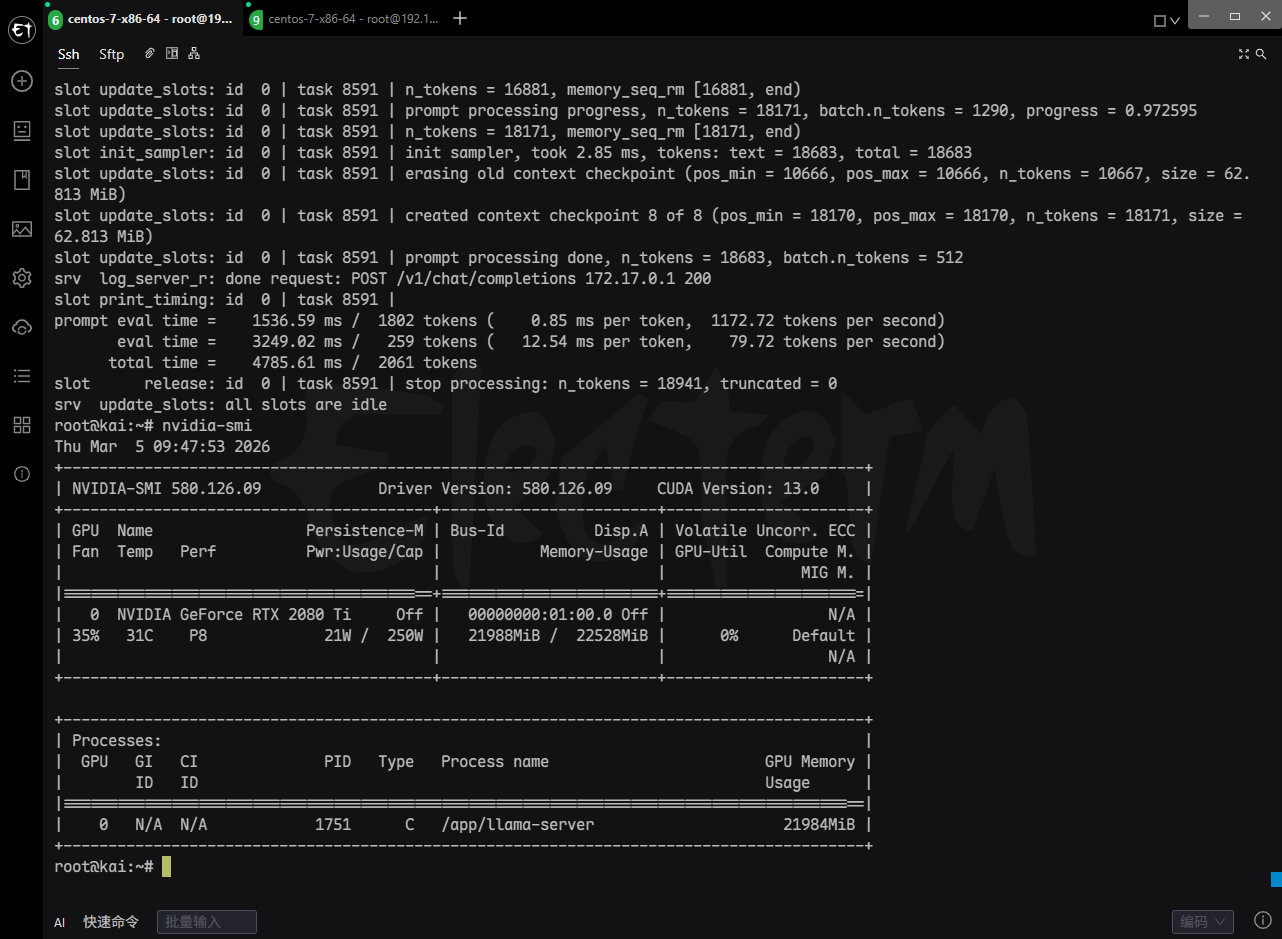
4. GPU Memory Usage
| Component | VRAM Usage | Notes |
|---|---|---|
| Model Weights | 18,590.99 MiB ≈ 18.15 GB | All 39 repeated layers + output layer offloaded to GPU |
| KV Cache | 2,500.00 MiB = 2.44 GB | Supports 128K context, 10 layers, f16 precision (K: 1.22GB, V: 1.22GB) |
| Recurrent State (RS) Buffer | 62.81 MiB | MoE expert state cache (R + S) |
| Compute Buffer | 493.00 MiB | Temporary buffer for Flash Attention and other kernels |
| Total VRAM Usage | ≈ 21.25 GB | Near the 22GB limit of RTX 2080 Ti |
OpenClaw Deployment Guide
Project Resources
- GitHub: https://github.com/openclaw/openclaw
- Documentation: https://docs.openclaw.ai/
- Skills Marketplace: https://clawhub.ai/skills
Deployment Steps
1. Clone the Repository
git clone https://github.com/openclaw/openclaw
cd openclaw
2. Build Docker Image
docker build -t openclaw:latest -f Dockerfile .3. Configure .env
OPENCLAW_IMAGE=openclaw:latest
OPENCLAW_CONFIG_DIR=./config
OPENCLAW_WORKSPACE_DIR=./workspace
OPENCLAW_GATEWAY_PORT=18789
OPENCLAW_BRIDGE_PORT=18790
OPENCLAW_GATEWAY_BIND=lan
4. Initialize via Onboarding Wizard
docker compose run --rm openclaw-cli onboard5. Configure Local Model (config/openclaw.json)
{
  "agents": {
    "defaults": {
      "model": {
        "primary": "llama-cpp/Qwen3.5-35B-A3B-UD-Q4_K_M"
      },
      "maxConcurrent": 4,
      "workspace": "/home/node/.openclaw/workspace"
    }
  },
  "models": {
    "providers": {
      "llama-cpp": {
        "baseUrl": "http://10.0.0.1:8001/v1",
        "apiKey": "not-needed",
        "api": "openai-completions",
        "models": [{
          "id": "Qwen3.5-35B-A3B-UD-Q4_K_M",
          "name": "Qwen3.5-35B-A3B-UD-Q4_K_M",
          "contextWindow": 128000,
          "maxTokens": 65536,
          "cost": { "input": 0, "output": 0 }
        }]
      }
    }
  },
  "controlUi": {
    "allowInsecureAuth": true
  }
}
6. Start the Gateway
docker compose up -d openclaw-gatewayAccess the Web UI dashboard. If unsure of the URL/token, run:
docker compose run --rm openclaw-cli dashboard --no-open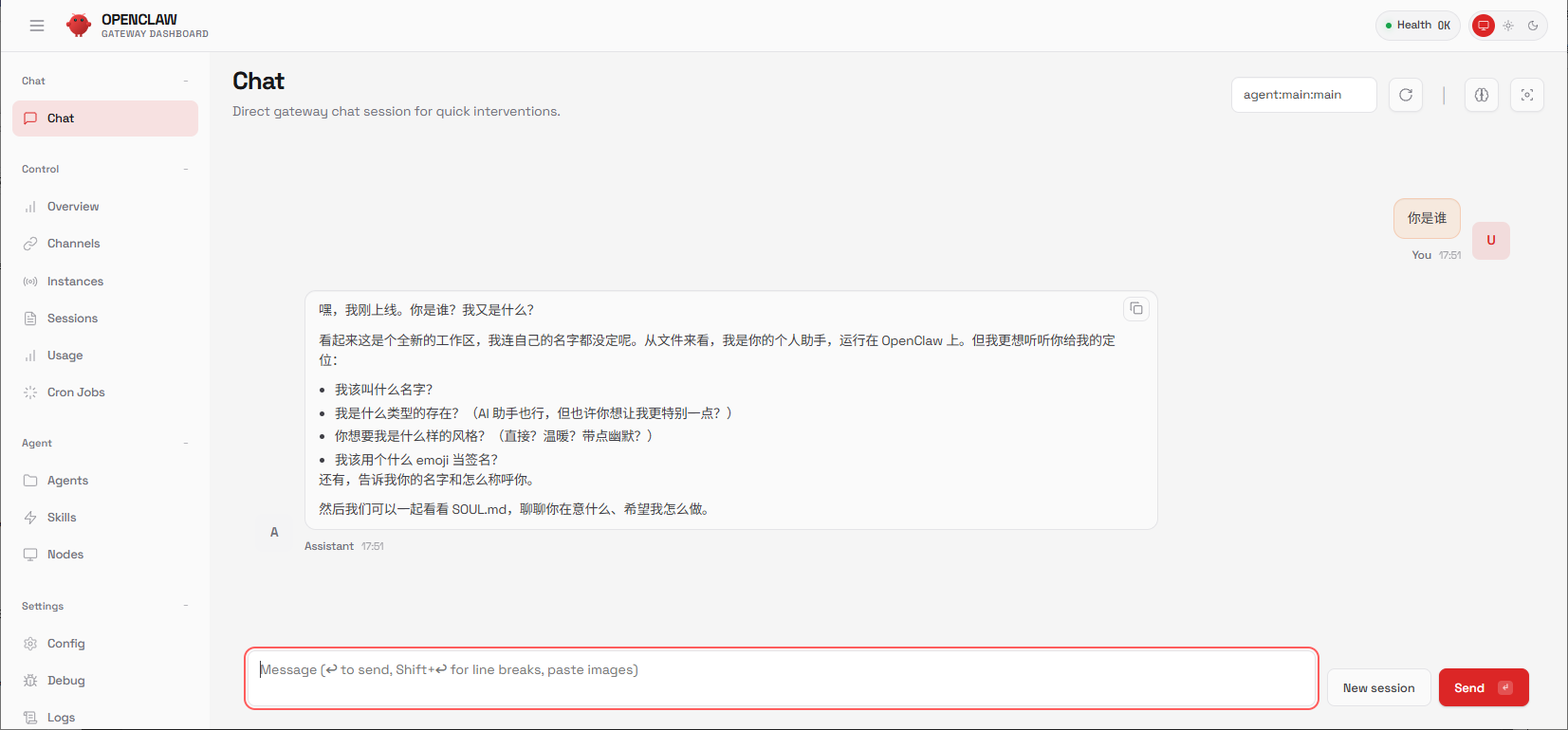
7. Integrate Telegram via CLI
- Create a bot via
@BotFatherand obtain its token. - Enable Telegram in
openclaw.json:
"channels": {
  "telegram": {
    "enabled": true,
    "botToken": "YOUR_TELEGRAM_BOT_TOKEN"
  }
}- Approve first-time users via pairing code:
docker compose run --rm openclaw-cli pairing approve telegram <CODE>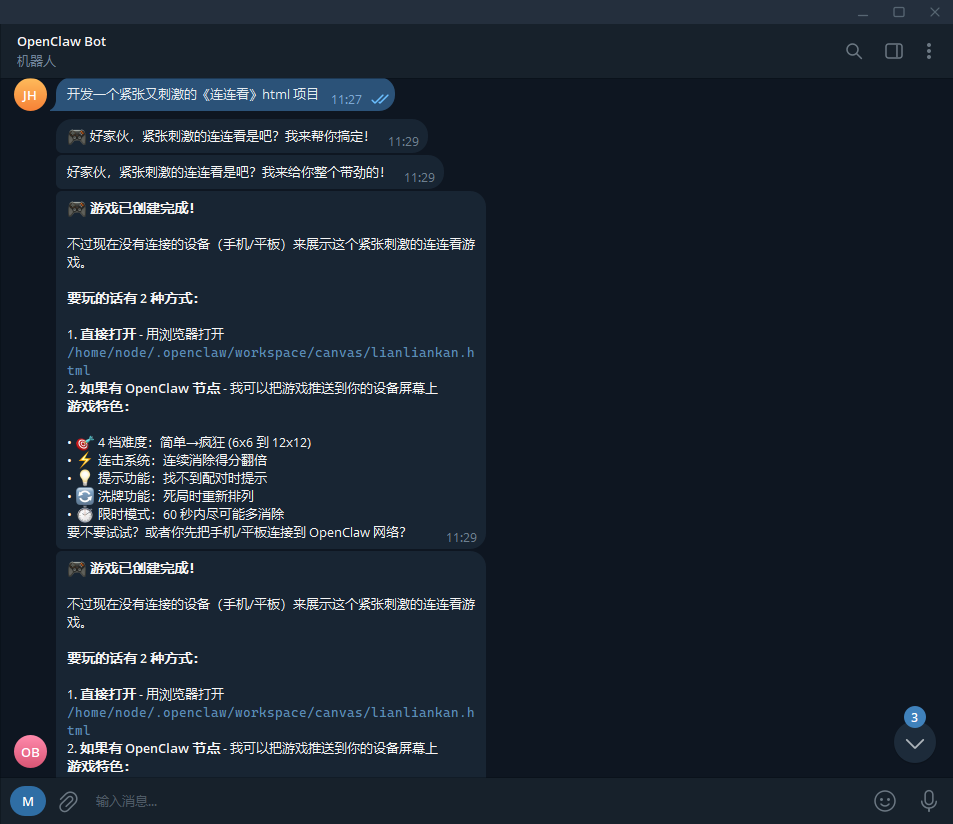
Common Issues and Notes
| Issue | Solution |
|---|---|
| Insufficient GPU Memory | Use lower quantization (e.g., Q3_K_M) or reduce --ctx-size |
| OpenClaw Pairing Fails | Ensure allowInsecureAuth: true and confirm Gateway is running |
| Slow Model Responses | Set --threads to match CPU core count; verify --n-gpu-layers=99 |
| RTX 2080 Ti Compatibility | Use server-cuda image (not rocm or metal) |
Summary and Recommendations
Best Practices
- Hardware: RTX 2080 Ti (22GB) stably runs Qwen3.5-35B-A3B in Q4_K_M quantization. For higher throughput, consider RTX 3090/4090.
- Model Choice: Under 22GB VRAM constraints, this setup offers an excellent balance for long-context, low-concurrency, high-accuracy private AI agents.
- Security: In production, disable
allowInsecureAuthand enforce SSL/TLS encryption for all communications.

john
The person is so lazy that he left nothing.
Article Comments(0)